Audit Logging
SCP stores audit logs for various key entities and fields for 90 days. Audit logging can be a critical feature for:
Compliance: Being able to trace an audit trail for critical data - "who changed what and when" - can be essential for compliance to security standards. For example, a log is created any time a user logs in or their permissions change, as well whenever financial information on a product or order changes.
Business intelligence: Being able to view and report on the activity of employees and customers can inform business decisions by revealing patterns and potential opportunities for improvements. For example, with audit logging you can find out which employees processed the most orders, or which product's inventory levels changed the most.
Troubleshooting: Finding out what happened to the information in the system can help diagnose issues with your workflow and processing when something goes wrong. The audit logs can be a huge help with this. For example, when a unit's location changes unexpectedly, the audit logs will tell you what process on the server changed it and when.
Integrations: The audit logs serve as an event log for key changes to the system, and they are available for querying via the API. As such they can be very useful for integrations from outside systems. For example, you can query the audit logs for a list of orders whose status changed, in order to trigger an import to an outside system.
How To Access Audit LogsWhat Fields Are Tracked for AuditingFields Common to the Audit Logs for All EntitiesCreating Reports with Audit LogsExporting Audit LogsAudit Logs and IntegrationsRequest Logs
How To Access Audit Logs
Employees with the appropriate permissions access the system's audit logs directly from the administrator interface. Navigate to Operations -> Audit Logs and you'll see a list of the available logs. In this screenshot, the audit logs for Agreements are being shown:
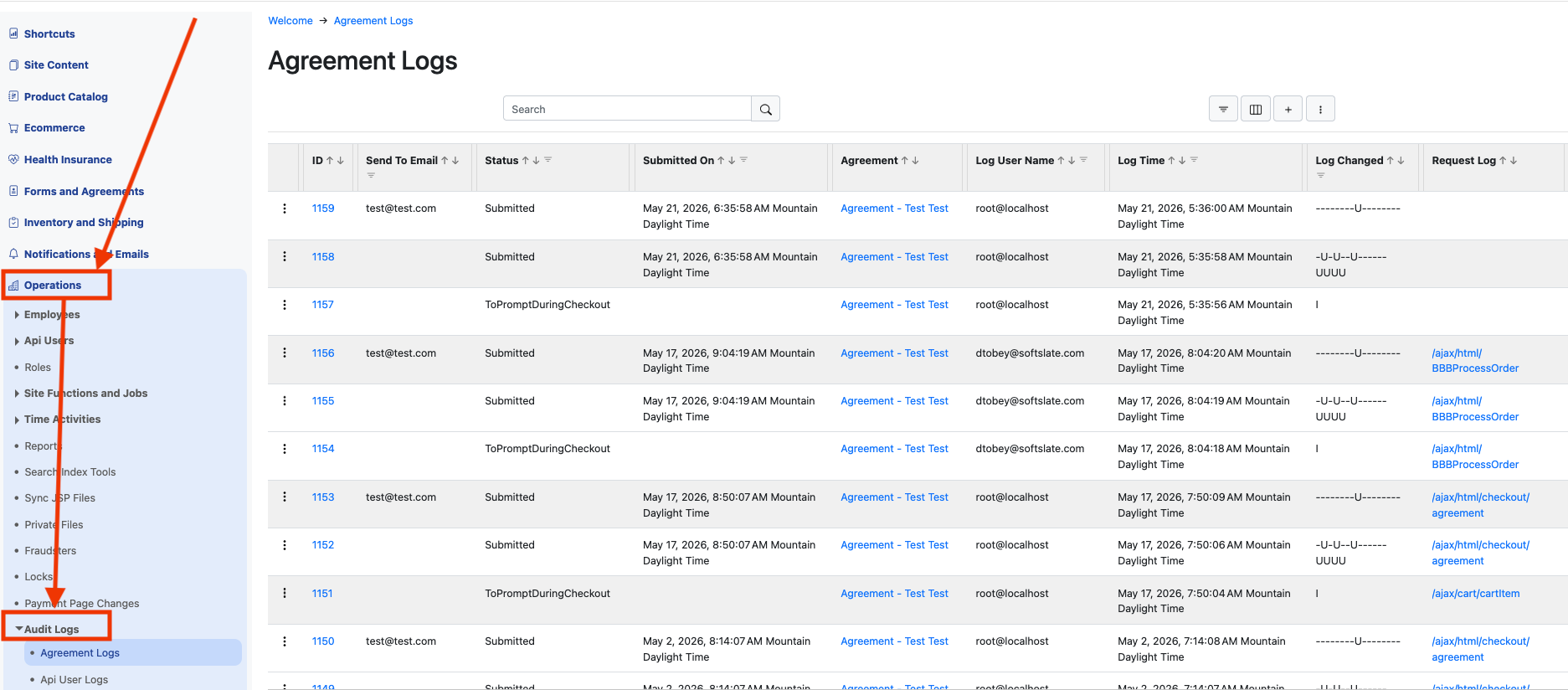
These screens should be familiar to you if you have used any of the grid screens throughout the rest of the administrator - they work exactly the same. Audit logs are like any other entity in the system, which means they can be filtered, sorted, and so on. For full details, please visit the documentation for Administrator Grid Screens.
What Fields Are Tracked for Auditing
Audit logs do not keep track of changes to every field in the database. They are focused on fields that are relevant to financial information, inventory tracking, security, and other key touchpoints. Whenever any of the audited fields are changed, a new audit log record is created that stores the new values of the fields, who changed it, and when. Note: if you need to have an additional field or fields tracked for auditing, please Contact Us.
Fields Common to the Audit Logs for All Entities
Along with the fields being tracked for auditing, each audit log record includes these fields:
Log User Name: The user name of the employee or logged-in customer making the change. If the change was made by a Job, or other internal process, the name of the job or process goes here too.
Log Time: The timestamp of when the change took place:
Log Changed: This is a shorthand field for which fields changed, and it also indicates if the parent record was inserted ("I") or deleted ("D").
Request Log: this is a link to the Request Log record that triggered the change (if it was triggered by a request and not job or other process). It can be a huge help in diagnosing issues because it can tell you the context of the changes that were made.
Creating Reports with Audit Logs
Audit logs share the same report features as the other entities in the system. For each audit log entity, you can design reports and have them emailed to you regularly. For full details, please visit the Reports Feature documentation.
Exporting Audit Logs
Like any other entity in the system, administrators can export audit logs. For full details, please visit the documentation on Exports and Imports. Note: audit logs are read-only, so they cannot be imported, only exported.
Audit Logs and Integrations
Audit log entities are fully represented in the SCP API. Since they track changes to critical data in the system, they can serve as an event log that you can poll, in order to integrate with other systems. You can pull down lists of audit log entities, as well as the details for individual records. For full details please visit our API Documentation. Note that audit logs are read-only, so you cannot insert, update or delete them. Audit logs are removed by the system after 90 days.
Request Logs
Request logs are a special type of audit log - here, we record every request made into the system:
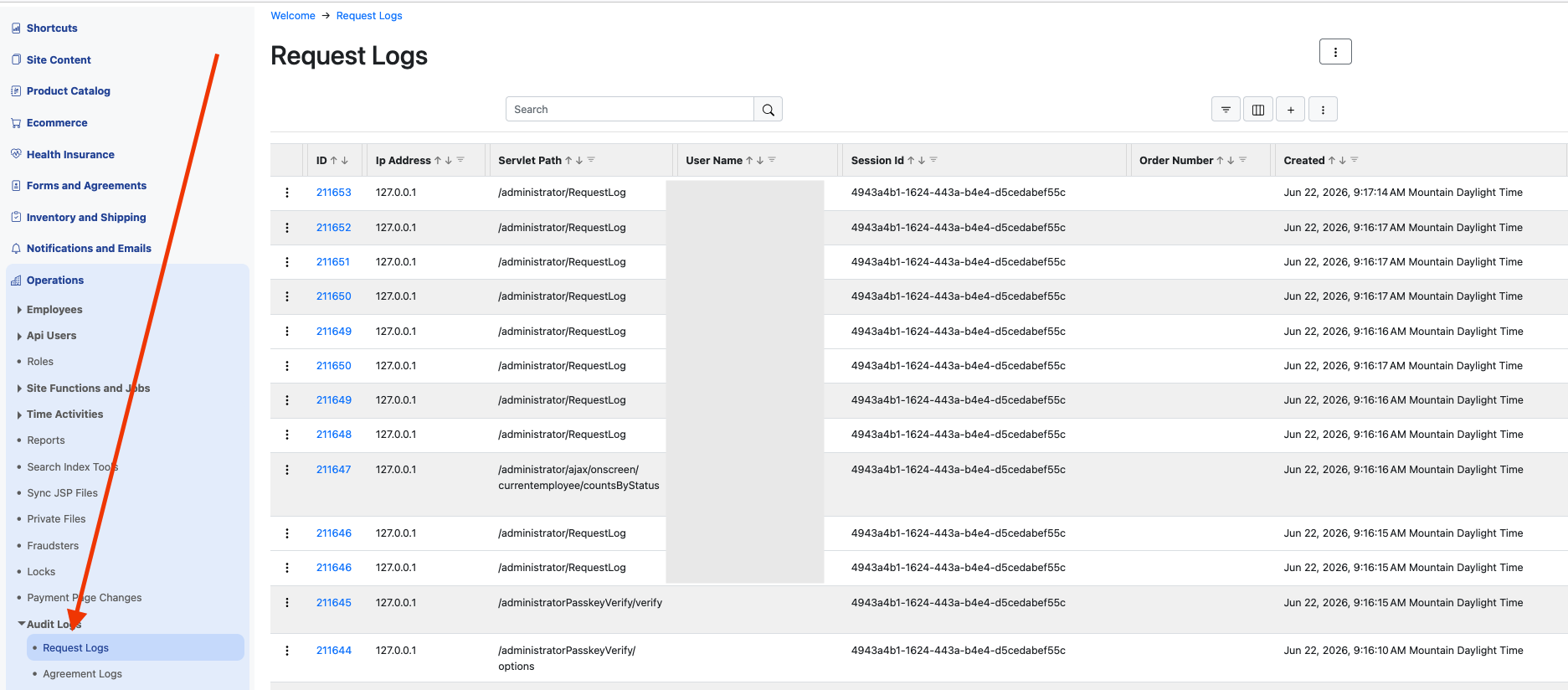
Each request log entry records key fields such as the URL being requested, the user name of the user (if they are logged in), and their session id. By filtering on the session id, you can see at a glance the pathway taken by the user through the application. If an order is associated with the request, the order number is also recorded, which can make troubleshooting very easy.
Like audit logs, request logs are removed by the system after 90 days.