Redirects Feature
The Redirects feature of SCP is a very simple but powerful way to control your site's navigation and traffic. Within the administrator interface, employees can manage the URLs the application serves; point old URLs to new ones; create shortcut URLs for particular pages; and more.
Redirects Grid Screen
To manage the redirects in effect for your site, click the Redirects menu option under Site Content:
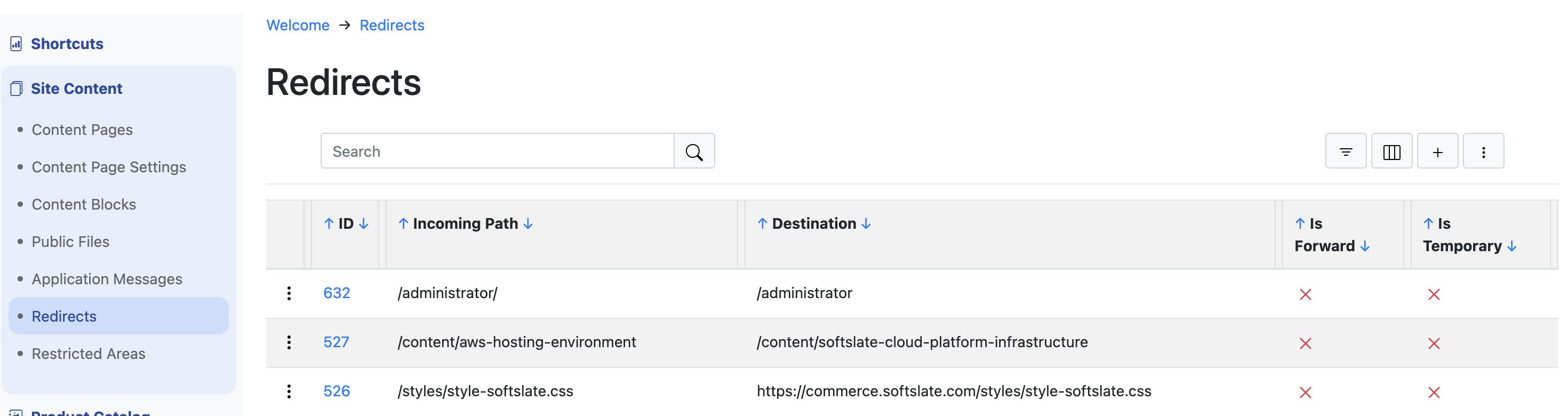
To create a new redirect, simply click the plus icon near the upper-right.
The Redirects screen is a typical grid screen in the SCP system, and shares all the features common to grid screens, such as pagination, sorting, searching, and filtering. For full details, please visit the document on Administrator Grid Screens.
Redirects Options
Here are some notes about the different fields and options for each redirect you create:
Incoming Path
This is the relative path for an incoming request into your site running on SCP. It should always begin with a slash "/" and it contains the rest of the URL following the initial domain name.
Destination
The destination is where the user is sent when they arrive at the site using the incoming path. This value can be either a relative path starting with slash (eg "/some-other-page", or a complete URL, such as "https://www.google.com". If a relative path is used, the domain name of the original request is reused.
Is Forward
A "forward" is a special type of redirect in which the URL in the user's browser does not change. The most common use for forwards is to create "shortcut" URLs for particular pages. For example, if your most popular page is "/content/some-popular-content-page", you could create a redirect record with that as the destination and something sorter, like "/popular" as the incoming path. When users arrive at "/popular" they are shown the page, and what's more, the URL in their browser does not change, making it easier for them to copy and share.
Important: if you enable the Is Forward option, the Destination cannot be a full URL. It must be a relative URL starting with slash.
Is Temporary
This flag determines if the system sends back a 301 (permanent) or 302 (temporary) URL to the browser. In either case, the user is redirected to the destination. This flag can be useful, for example, if you are in the middle of reorganizing your site's structure. It informs browsers and search engine about whether or how long to cache the redirect.
Note: this flag is not relevant if you enabled the Is Forward option for the redirect.